Learn how to use 668 sms code in Pakistan the right way, what to do if it doesn’t reply, and how to read your results correctly. Simple guide for every network.
You’ve probably seen the number “668” mentioned somewhere — a news article, a friend’s advice, or maybe a warning about SIM fraud. It sounds simple enough: send a text, get a reply. But a lot of people still aren’t sure exactly what this code does, what to expect from the reply, or what to do if it doesn’t work the first time.
This guide covers how to use 668 sms code in Pakistan from start to finish, including the small details most articles skip — like why the reply might be delayed, what the numbers actually mean, and what to do next. Whether you’re trying it for the first time or troubleshooting an issue, you’ll find the answers here.
Quick Overview Table
| Detail | Information |
|---|---|
| Code Name | 668 SMS Code |
| Managed By | Pakistan Telecommunication Authority (PTA) |
| Function | Reveals the number of SIMs registered on a CNIC |
| Format | 13-digit CNIC number (no dashes) |
| Cost | Free |
| Response Time | Usually within a few seconds to a couple of minutes |
| Works On | All major networks (Jazz, Zong, Telenor, Ufone) |
What Is the 668 SMS Code, Exactly?
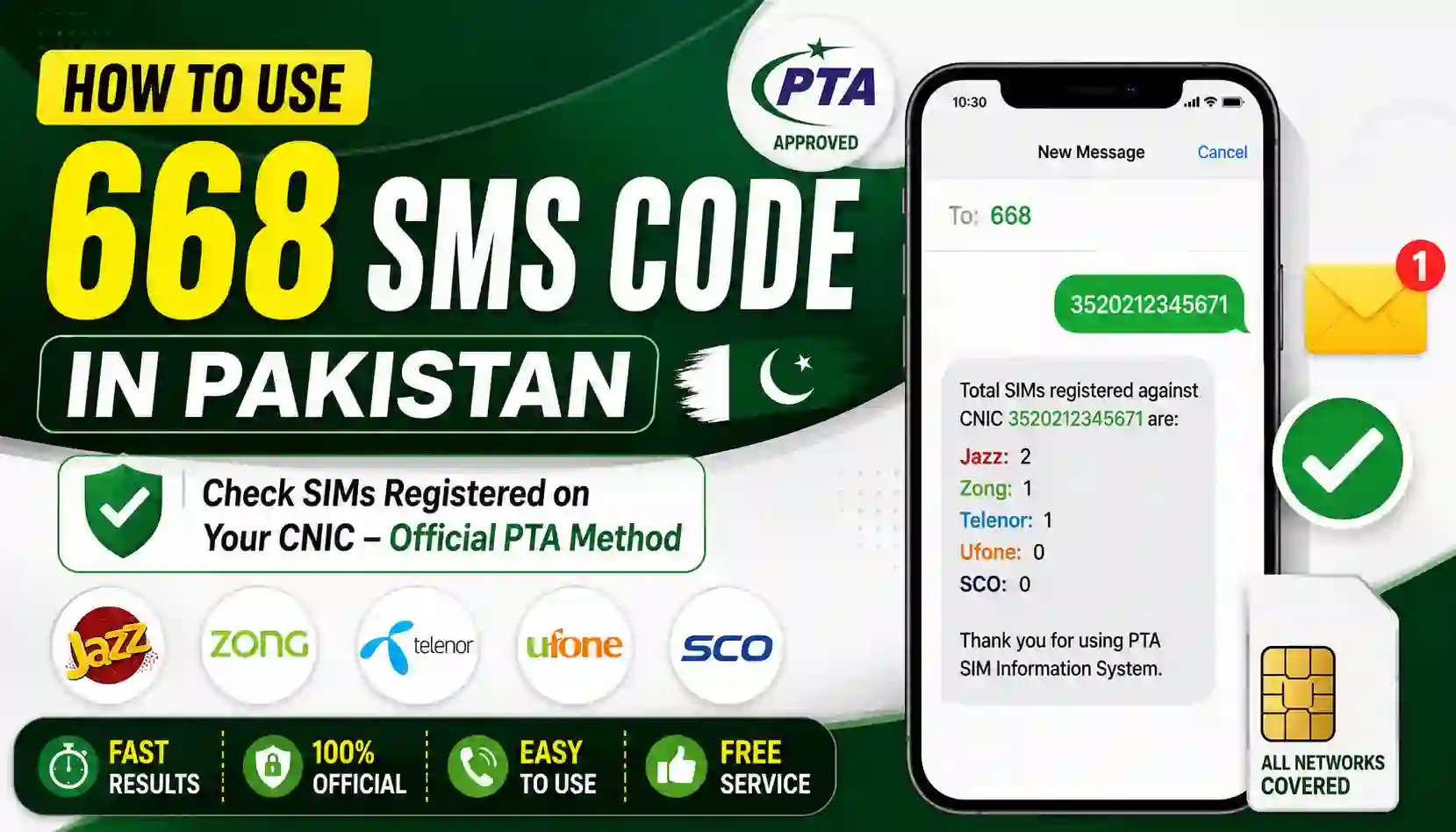
Think of 668 as a direct line to PTA’s SIM database. Instead of calling a helpline or visiting a website, you simply send your CNIC number as a text message, and the system checks its records to tell you how many SIMs are registered against that CNIC.
It’s a small piece of infrastructure, but it plays a big role in helping people spot unauthorized SIM registrations before those numbers cause any trouble.
How to Use 668 SMS Code in Pakistan: Step-by-Step
Step 1: Pick Any Phone With an Active SIM
You don’t need a smartphone or data connection. Even an old-fashioned keypad phone will do the job, as long as it can send a standard text message.
Step 2: Format Your CNIC Correctly
This is where a lot of people get stuck. Your CNIC must be entered as 13 digits with no dashes and no spaces. So instead of writing 42101-1234567-1, you’d type 4210112345671.
Step 3: Send the Message to 668
Open your messaging app, paste or type your CNIC number, and send it to the short code 668. There’s no fee for this message.
Step 4: Read the Automated Reply
The system will text back with the total SIM count linked to your CNIC, usually broken down by network operator. Take a screenshot if you want to keep a record with the date visible.
Step 5: Troubleshoot If Needed
If you don’t get a reply within a few minutes:
- Double-check your CNIC format — even one extra space can cause an error.
- Confirm your SIM has network signal.
- Try again after a short wait, since the system can occasionally be slow during high traffic.
- Use the alternative PTA web portal if the SMS route still isn’t working.
What the Results Actually Mean
Once you get your reply, compare the numbers against what you actually use. For example:
- If PTA shows 3 Jazz numbers but you only use 1, that’s 2 unaccounted-for SIMs.
- If the total matches what you personally own, you’re all clear.
Any mismatch is worth looking into further, since those extra numbers are technically your responsibility under current regulations.
What to Do If You Spot an Unfamiliar SIM
Finding an unknown number doesn’t have to be stressful. Here’s the general path forward:
- Note down the operator showing the mismatch.
- Visit that operator’s franchise with your original CNIC.
- Ask to disown the unauthorized number.
- Complete a quick biometric verification to confirm your identity.
- Re-check via 668 a day or two later to confirm the number has been removed.
Pakistanis living abroad can use PTA’s dedicated overseas facility to handle this without needing to visit a franchise in person.
Required Documents
To make full use of this process, keep the following ready:
- Valid, original CNIC
- Any phone with an active SIM to send the message
- A note of the numbers you personally use, for comparison
- Basic contact details for your network operator, in case follow-up is needed
Benefits of Knowing How to Use the 668 Code
- Quick and free — no cost, no lengthy forms
- No internet required, making it accessible almost anywhere in Pakistan
- Early warning system for unauthorized SIM activity
- Simple to repeat, so you can check regularly without hassle
- Supports better record-keeping for your own mobile identity
Contact Details Table
| Operator | Helpline | SMS Code |
|---|---|---|
| Jazz | 111 | 668 |
| Zong | 310 | 668 |
| Telenor | 345 | 668 |
| Ufone | 333 | 668 |
| PTA Complaint Portal | Available online | complaint.pta.gov.pk |
Handy Tips for Next Time
- Save the 668 code in your contacts so it’s easy to find later.
- Repeat the check every couple of months, similar to reviewing a bill.
- Never share your CNIC digits publicly on social media or with strangers.
- Use only the official code and PTA’s portal — steer clear of random apps promising the same results, since they aren’t verified by PTA.
Frequently Asked Questions (FAQs)
Q1: Why didn’t I get a reply after sending my CNIC to 668? This usually happens due to an incorrect CNIC format or a temporary network delay. Double-check the digits and try again after a few minutes.
Q2: Is there a limit to how many times I can use the 668 code? There’s no strict limit mentioned by PTA, though it’s best used as a periodic check rather than repeatedly within a short span.
Q3: Does the 668 code work on all networks in Pakistan? Yes, it works across all major operators, including Jazz, Zong, Telenor, and Ufone.
Q4: Can I use 668 to check someone else’s CNIC? No, this service is designed for checking your own CNIC using your own registered mobile number.
Q5: What should I do if the SIM count seems wrong? Visit your operator’s franchise with your original CNIC to verify and correct the record if needed.
Q6: Is the 668 code an official PTA service? Yes, it’s officially maintained by the Pakistan Telecommunication Authority for public use.
Final Thoughts & Call to Action
Now that you know how to use 668 sms code in Pakistan properly — including what to do if things don’t go smoothly the first time — you’re better equipped to keep an eye on your mobile identity. It’s a small habit that takes almost no time but adds real value to your digital safety.
Looking for more guides like this? Explore Apk eSim for clear, practical articles on SIM services, eSIM activation, and mobile network tips designed for everyday users across Pakistan. For official information straight from the regulator, visit the Pakistan Telecommunication Authority (PTA) website.
Stay one step ahead — check your SIM status today, and make it a habit that protects you tomorrow.